# MalDoc101
> It is common for threat actors to utilize living off the land (LOTL) techniques, such as the execution of PowerShell to further their attacks and transition from macro code. This challenge is intended to show how you can often times perform quick analysis to extract important IOCs. The focus of this exercise is on static techniques for analysis.
>
> As a security blue team analyst, analyze the artifacts and answer the questions.\
> \
> Link:
Hi all,
in this challenge we will analyze a delivered, malicious Office document that contains several stages of obfuscated code.
Since some questions are pretty straight forward, I will spent most of the write-up on the extraction and deobfuscation of the embedded Powershell script.
I mainly used a simple text editor with syntax highlighting and Binary Refinery to dig through this malware and additional stages.
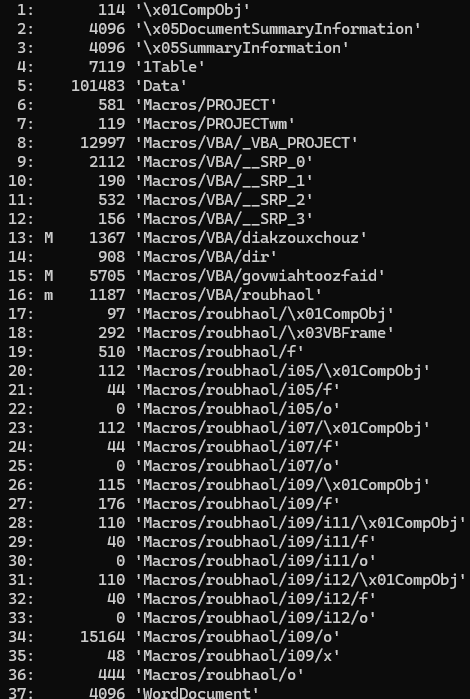
## Press enter or click to view image in full size**Question 1: Multiple streams contain macros in this document. Provide the number of highest one.**
This question can be answered with oledump:
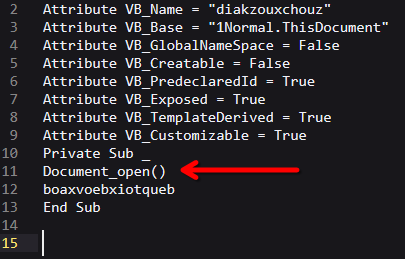
## **Question 2: What event is used to begin the execution of the macros?**
One of the extracted macros contains the specific event and the name of the function, that will be executed upon opening the document.
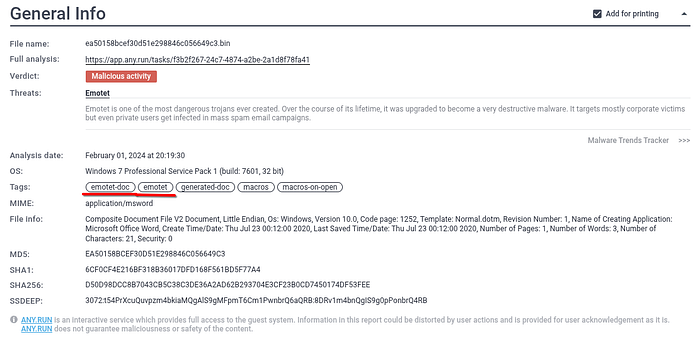
## **Question 3: What malware family was this maldoc attempting to drop?**
I just searched for the MD5 hash
*ea50158bcef30d51e298846c056649c3*
and was able to find the answer online. In my case, [any.run](https://any.run/report/d50d98dcc8b7043cb5c38c3de36a2ad62b293704e3cf23b0cd7450174df53fee/f3b2f267-24c7-4874-a2be-2a1d8f78fa41) helped me.
## **Question 4: What stream is responsible for the storage of the base64-encoded string?**
It is stream 34. If we perform the steps described later on the specific stream (Macros/roubhaol/i09/o) we are able to extract the executed command.\
However, I prefer to solve such kind of tasks in a more general way. That’s why I searched in the whole document for the obfuscated string.
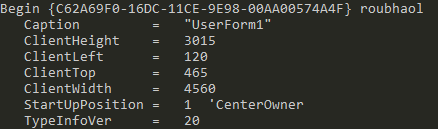
## **Question 5: This document contains a user-form. Provide the name?**
If we print out the strings of the whole document, we get some settings about the implemented user-form:
## **Question 6 — Question 9**
To detect a repeating pattern (Question 6), I used to following Binary Refinery command:
```
emit.exe sample.bin | xtdoc.exe | carve printable --longest -t 1 | drp
```
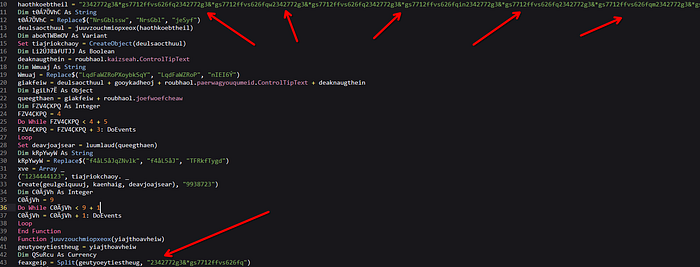
It searches automatically for a repeating pattern, in the longest, printable string of the whole document. Additionally, we see this pattern in one of the extracted VBA macros, and that a specific command is split at occurences of this pattern:
To find out which tool is used to execute the obfuscated string, we need to search in the whole document for this pattern and cut it out:
```
emit.exe sample.bin | xtdoc.exe | push [[ | carve printable --longest -t 1 | drp | pop pattern | repl var:pattern "" | carve printable --longest -t 1 ]]
```
Here it is clearly visible, that Powershell is used to execute the Base64 encoded command (Question 7).
To extract and automatically deobfuscate the embedded script, we need to use additional units. So, I used this concatenation of these Binary Refinery units:
```
emit.exe sample.bin | xtdoc.exe | push [[ | carve printable --longest -t 1 | drp | pop pattern | repl var:pattern "" | carve b64 --longest -t 1 | b64 | repl h:00 "" ]
```
What this one-liner does, is to extract the whole content of the provided, malicious Word file and print only the longest printable string. Within this string, the command *drp* detects a repeating pattern automatically and saves it into the variable *pattern*. Then, we cut out this repeating pattern and display the longest Base64 encoded string. The unit *b64* then decodes it automatically and finally each NULL byte is deleted.\
This results in an readable Powershell script, visible in the above screenshot.
With this cleartext script we are able to answer question 8 and 9.
Especially for question 9, we can use this command, to only display embedded domains:
```
emit.exe sample.bin | xtdoc.exe | push [[ | carve printable --longest -t 1 | drp | pop pattern | repl var:pattern "" | carve b64 --longest -t 1 | b64 | repl h:00 "" | xtp.exe domain ]]
```
---
# Agent Instructions: Querying This Documentation
If you need additional information that is not directly available in this page, you can query the documentation dynamically by asking a question.
Perform an HTTP GET request on the current page URL with the `ask` query parameter:
```
GET https://txc.gitbook.io/documentation/writeups/cyberdefenders/maldoc101.md?ask=
```
The question should be specific, self-contained, and written in natural language.
The response will contain a direct answer to the question and relevant excerpts and sources from the documentation.
Use this mechanism when the answer is not explicitly present in the current page, you need clarification or additional context, or you want to retrieve related documentation sections.